
Maintaining accurate and complete faculty profiles is time-consuming. Much of the information institutions rely on exists primarily in CVs and other unstructured documents, making it difficult to capture consistently and at scale.
AI-Assisted Profile Curation transforms how research information is captured and maintained in Symplectic Elements. It combines two complementary capabilities:
- AI-Assisted Data Entry – paste text for a single item (a publication, grant, teaching activity, or professional activity) and generate a structured record in seconds
- AI-Assisted CV Import – a complete document-to-profile workflow for onboarding and large-scale profile completion
Together, they reduce manual effort, improve metadata quality, and accelerate profile completion at scale.
With AI-Assisted Profile Curation you can:
- Accelerate onboarding of new faculty
- Complete incomplete profiles ahead of assessment or review cycles
- Reduce manual data entry across disciplines
- Improve data quality through structured metadata and intelligent matching
- Maintain full control with user validation before any data is saved
How it works:
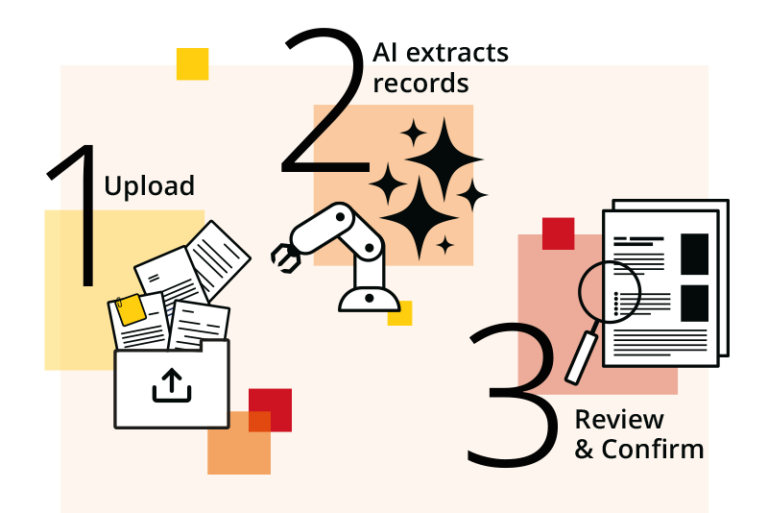
- Upload or paste
Paste plain text or upload a document, including full CVs, covering publications, grants, teaching, and professional activities. - AI structures the data
AI extracts and organises content into structured Elements records, mapped to your institution’s metadata schema, including custom fields and item types where applicable. - Review and confirm
All extracted items are presented for review before being saved. Users retain full control—nothing is added without approval—ensuring transparency and data integrity.
The Symplectic Elements approach to AI
Both AI-Assisted Data Entry and AI-Assisted CV Import are built on the same core principles:
Human-in-the-loop review. Extracted items are always presented for review before saving. Nothing is added to a profile without explicit user confirmation — full transparency and data integrity are guaranteed.
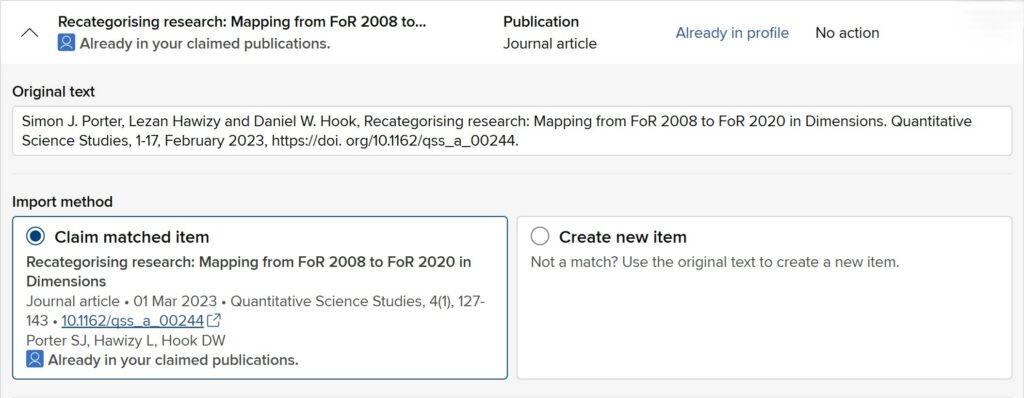
Intelligent matching and deduplication. Both features check extracted metadata against existing Elements records to prevent duplicates:
- Publications are matched on DOI, Dimensions ID, PMCID, arXiv ID, and Scopus EID
- Grants are matched against funder name and grant reference (via Dimensions)
- Matches already in Symplectic Elements are prioritized, so users aren’t asked to choose between multiple records that represent the same item
Granular access control. Administrators can enable or restrict access at the group or individual level, supporting phased rollouts and institutional oversight. Access to CV Import and access to single-item Data Entry are managed independently, so you can configure each separately.
Shared usage model. Both features are available to Digital Science-hosted Symplectic Elements customers and are metered through the same AI Credits balance, which can be purchased in packages (similar to support hours) and is shared across all your Symplectic Elements instances.
AI-Assisted Data Entry
Users copy in text describing a single item — CV or resume text, a preprint’s publication details and abstract, publication details from an open-access source, or the details from a grant award letter — and Symplectic Elements extracts structured metadata for review. If the same text has been used before, Symplectic Elements flags the existing item rather than creating a duplicate; for publications, a DOI in the pasted text is also checked against CrossRef and existing records.


‘University of Oregon’s experience using the AI-assisted entry tool has helped us implement the system quickly at the university, has particularly supported the data collection for faculty in our professional schools, and has encouraged faculty and administrator buy-in. Our faculty provide their activity information in the system quickly and in a more standardized and readable manner, which means we are then able to use it for all of our major faculty reviews.’
AI-Assisted CV Import
AI-Assisted CV import goes beyond single-item entry into a true document-to-profile workflow. Users drop in a full CV (PDF or pasted text), and the system extracts and organizes the content — including items that don’t come from standard indexed sources — into records mapped to your institution’s Elements schema, custom fields included.
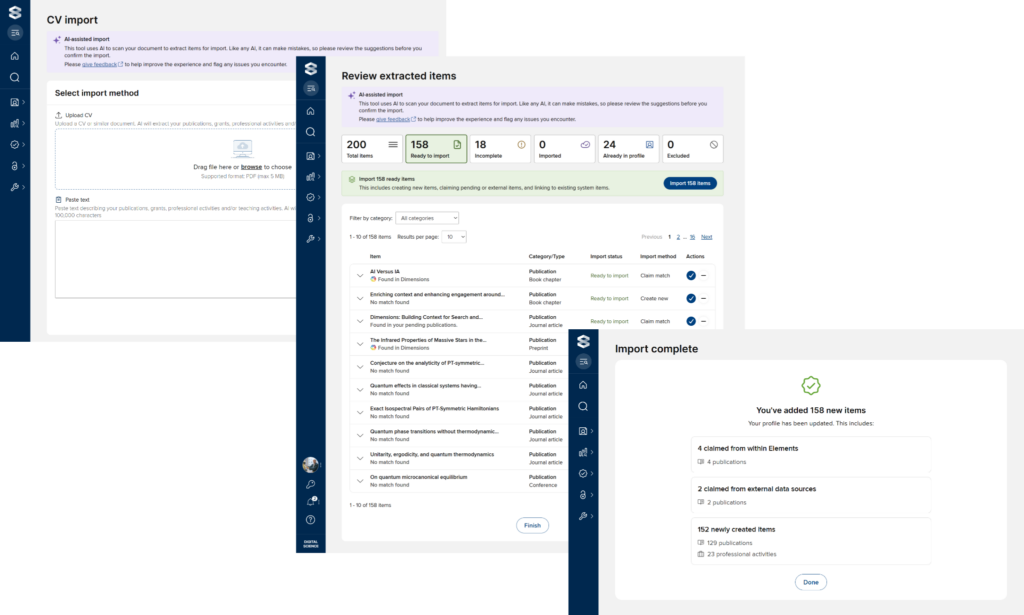
- Bulk review workflow. Import records in bulk, review and edit items individually, and save progress to return at any time — a session can span multiple sittings.
- Remembered exclusions. Items a user excludes from import are remembered; if the same text appears in a future import (e.g. an updated CV), it’s automatically placed in the “Excluded” section, saving the need to re-exclude it.

- Traceability. Items created or claimed via CV Import are logged in the item’s history entry and in the Reporting Database’s item history tables.
- Captures the “long tail.” While automated harvesting still handles most publications, CV Import is designed to surface professional activities, institutional service, teaching activities, NTROs, and grants that don’t appear in institutional sources or Dimensions.
AI Credits: How does it work?
Both features draw from the same AI Credits balance:
- Credits are purchased in packages, independent of your annual renewal cycle, and applied as a “pot” that becomes active immediately or on a requested future date; each pot expires 12 months after activation.
- As a guide, one credit typically covers the full import of a 20-page academic CV (around 300 new items); actual usage depends on document size, complexity, and item count, and is reduced where items can be matched via DOI or other identifiers, or have been imported before.
Administrators can track credit balance, along with active, upcoming, used, and expired pots, from a dedicated interface on the AI Settings page.
AI-Assisted Profile Curation is available to Digital Science-hosted Symplectic Elements customers.
AI-Assisted Profile Curation
To learn more about AI-Assisted Profile Curation, speak to a member of our team.